SlideShow
0
Design Deadline Met
Today we compared all our completed designs and thoroughly evaluated them to give us an outcome of the most suitable for our website.

When comparing our timescales to our project plan it is clear to see that we have over ran ourAll the different pages were evaluated individually and if we couldnt reach an agreement between us we decided to merge the favourite ideas together in order to create designs that we all thought were good enough and gave the audience a much better experience when viewing our website.
We are now officially in the construction stage, and will begin building our website from scratch using html and css.

When comparing our timescales to our project plan it is clear to see that we have over ran ourAll the different pages were evaluated individually and if we couldnt reach an agreement between us we decided to merge the favourite ideas together in order to create designs that we all thought were good enough and gave the audience a much better experience when viewing our website.
We are now officially in the construction stage, and will begin building our website from scratch using html and css.
0
Team Meeting Minutes
Review of previous meeting
1-5:
We have altered the design from the previous meeting to
Meet the requirements needed and to make sure that we all
Agree with it.
Check milestones
5-15:
Up to this point we have allocated extra responsibilities and
To change our project plan as the dates and allocated time
Were severely underestimated so the project plan needs to be
Amended.
See where we are against project plan
15-20:
From checking are milestones we realised that the project
Plan was inaccurate and needed to be changed but in
Accordance with the steps involved we are on schedule.
Update project plan if needed
20-35:
We amended the project dates and responsibilities to make it
More realistic and efficient to follow.
Make a PERT chart
35-37:
Decided as a team not to make a PERT chart.
Any problems:
Updating project plan ensuring dependencies are all correct
1-5:
We have altered the design from the previous meeting to
Meet the requirements needed and to make sure that we all
Agree with it.
Check milestones
5-15:
Up to this point we have allocated extra responsibilities and
To change our project plan as the dates and allocated time
Were severely underestimated so the project plan needs to be
Amended.
See where we are against project plan
15-20:
From checking are milestones we realised that the project
Plan was inaccurate and needed to be changed but in
Accordance with the steps involved we are on schedule.
Update project plan if needed
20-35:
We amended the project dates and responsibilities to make it
More realistic and efficient to follow.
Make a PERT chart
35-37:
Decided as a team not to make a PERT chart.
Any problems:
Updating project plan ensuring dependencies are all correct
0
Project Plan
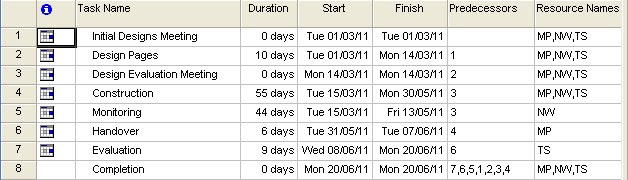
I have designed and built a project plan using Microsoft Project.

There appears to be a few problems with this original project plan which we have encountered when completing the project. We will have a team meeting in which the minutes from this meeting will be posted here. In this meeting we will discuss the corrections we need to make to our project plan in order to successfully complete our website on time and in perfect working order.

0
Image Types
The number of of different image formats are countless using a computer system. The most common image types within your computer are .BMP (Bitmap Image), .JPEG and JPG.
Different software tools use different image types and it is all dependant on what software is used as to what type of image is created.
All the different image formats are used for different things and have their own individual advantages and disadvantages.
When using a computer to print photo quality images, these images will be very large files as they need to have the highest quality with a much larger contrast of colours. These type of images formats include .tiff, .bmp and .psd. These types of images are not suitable to be loaded to the internet as they are so large and would increase the bandwidth of the website so dramatically that the website will either crash regularly or load extremely slow.
Image formats used in websites are most likely to be JPEG images or GIF.
These images use a much lower contrast of colours and therefore are alot smaller files and much more suitable for the web.
Different software tools use different image types and it is all dependant on what software is used as to what type of image is created.
All the different image formats are used for different things and have their own individual advantages and disadvantages.
When using a computer to print photo quality images, these images will be very large files as they need to have the highest quality with a much larger contrast of colours. These type of images formats include .tiff, .bmp and .psd. These types of images are not suitable to be loaded to the internet as they are so large and would increase the bandwidth of the website so dramatically that the website will either crash regularly or load extremely slow.
Image formats used in websites are most likely to be JPEG images or GIF.
These images use a much lower contrast of colours and therefore are alot smaller files and much more suitable for the web.
0
Creating a Logo
Today i created my logo for the website. Everyone in our team is creating a logo so we can compare them and decide which logo would be best for our website.
I thought the best tool for me to create a logo would be on Fireworks as it seems to be the easiest when creating images from scratch.
I downloaded a template shape of a logo from the templates folder within the software but deleted all specific detail and was left with just the plain shape.
I then added my own details to the logo to create a unique logo specific for our requirements.
I thought the best tool for me to create a logo would be on Fireworks as it seems to be the easiest when creating images from scratch.
I downloaded a template shape of a logo from the templates folder within the software but deleted all specific detail and was left with just the plain shape.
I then added my own details to the logo to create a unique logo specific for our requirements.
Subscribe to:
Posts (Atom)

